


How to Use AI in Marketing Automation

Nathan Schenker
This is some text inside of a div block.

September 30, 2026
.png)
If you work in marketing, you've heard the term AI marketing automation by now. It's in every platform's release notes and half the LinkedIn posts in your feed.
But what it means depends entirely on who's saying it.
For some marketers, it means using AI inside workflows that run only when a rule tells them to. A workflow is a chain of tasks your tools handle on their own once something kicks it off.
Think of a form submission that triggers a welcome email, with AI helping write the subject line.
For others, it means using AI to run the whole lead process. Reading replies, deciding what each person wants, and routing them without layering on more manual work.
As you can see, there’s a big difference between these two examples.
One is still traditional automation, just with AI added to it. The other is what AI marketing automation actually looks like.
Traditional automation is rules-based. It executes the steps you defined, in the order you defined them, for the situations you thought of when you built it.
On the other hand, AI marketing automation puts judgment inside the workflow.
It reads inputs nobody mapped, decides what they mean, and picks the next step on its own.
To put it simply, one follows instructions, and the other makes calls.
That difference is why so many companies may say they're using AI in their marketing automation processes, but can't point to a single tangible ROI metric to defend it.
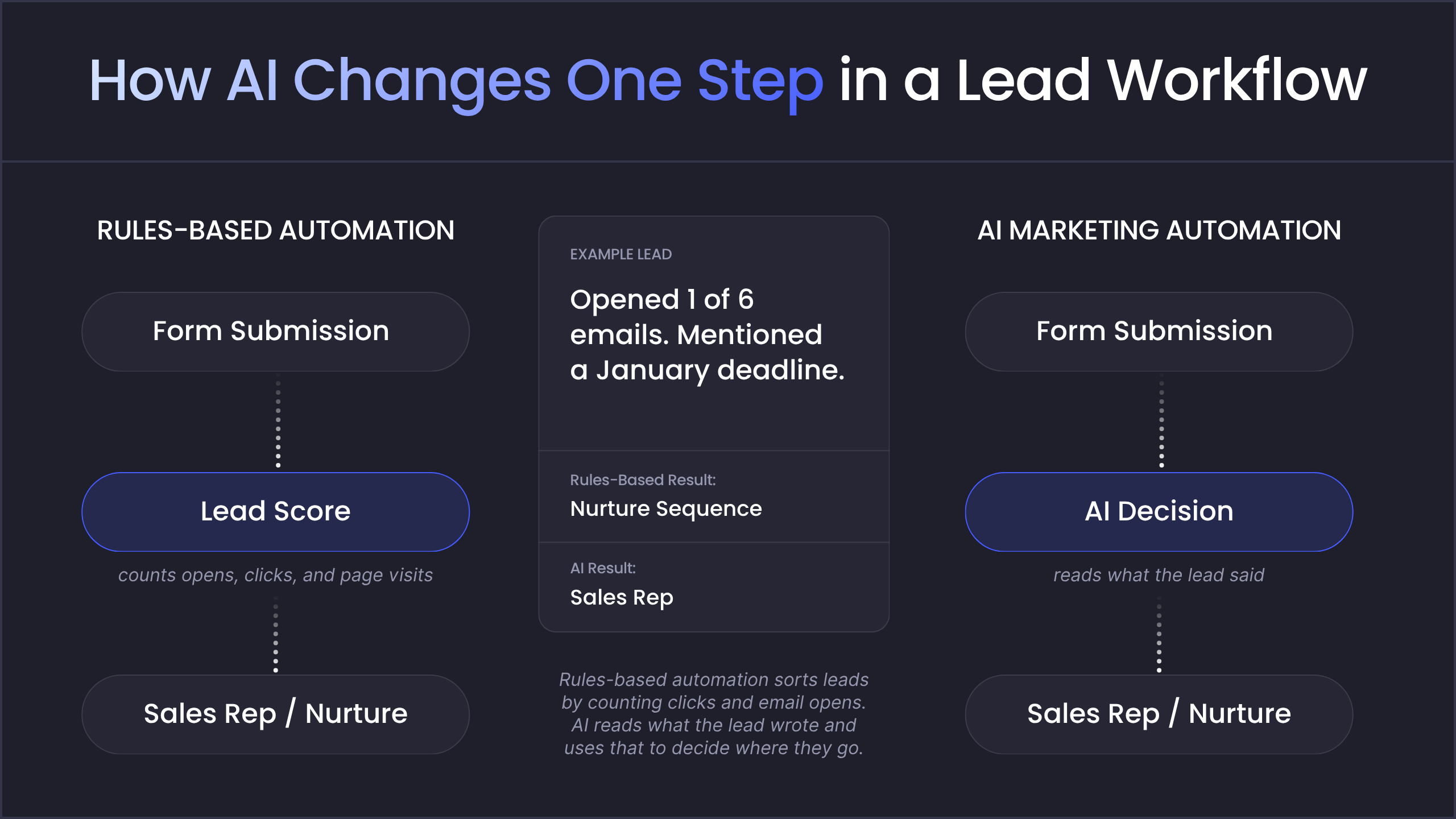
Basic Marketing Automation Versus AI-powered Marketing Automation
As we mentioned earlier, the key difference between traditional marketing automation and AI-powered marketing automation comes down to a rules-based approach versus a decision-based one.
Here's what that looks like in practice.
Traditional automation follows rules a person wrote in advance. For example, a form comes in, an email goes out, and three days later a second email follows. Every step happens because someone planned it ahead of time. That makes these workflows reliable and easy to check, which is why most marketing systems are still built on them.
AI marketing automation doesn't replace those workflows. It runs on top of them.
Only one thing changes: a step that used to follow a fixed instruction now makes a decision.
Lead management is a clear marketing automation use case for seeing how this works.
A rules-based workflow sorts leads by actions it can count: which form they filled out, which pages they visited, and how many emails they opened.
Each action adds to a score, and that score decides whether the lead goes to a sales rep or into a nurture sequence.
Replace that scoring step with an AI decision, and the workflow starts reading what each lead says instead of counting what they do. It looks at what the person typed into the form, how they replied to an email, or what they said on a call, then figures out what they're asking for.
So a lead who barely opened any emails but mentioned a January deadline goes straight to a rep. Meanwhile, a lead who says they're gathering information for a colleague stays in the nurture sequence.
The form, the CRM, and the email tool all stay the same. The only difference is that one instruction became a decision, and now the workflow can handle leads nobody planned for.
What Changes for Your Business When Workflows Can Decide
Once an artificial intelligence marketing automation can interpret instead of match, three things change: how fast leads hear back, how relevant each message is, and how much of your operation you can automate.
You Answer While the Lead Is Still Paying Attention
How quickly you respond to a lead affects whether it turns into a sales conversation.
A study published in Harvard Business Review analyzed 1.25 million leads across 42 companies. Firms that tried to contact a lead within an hour were nearly seven times as likely to reach a decision-maker as firms that waited even one hour longer.
Rules-based workflows can respond that fast, but only when an inquiry fits a path someone set up in advance.
For example, a demo request from your website form can trigger an instant confirmation email and create a task for a rep.
Inquiries that don't fit those paths usually sit in an inbox until a person reads them. That includes a question the form wasn't designed for, an email reply that doesn't match any template, or a request meant for a different team.
Marketing automations using AI can handle those inquiries, too. The AI reads the message, works out what the person is asking for, and sends it to the right place, whether that's a sales rep, the support team, or a nurture sequence.
This makes the biggest difference outside business hours. With a rules-based workflow, a lead who writes in at 9 p.m. gets a generic auto-reply, and their message waits until someone reads it the next morning. With AI in the workflow, the message has already been read and routed by then, so the rep can go straight to following up.
Relevance Stops Costing You Headcount
Most email marketing relies on segmentation. Marketers sort contacts into a handful of groups, such as by industry or company size, and write one email sequence for each group. Everyone in the same group receives the same emails on the same schedule.
Teams use segmentation because it's manageable, even though it isn't the most effective approach. A team can realistically write and maintain six sequences. It can't write a separate one for each of its four thousand contacts.
That trade-off has a measurable cost.
Twilio's 2025 State of Customer Engagement Report found that 88% of consumers say they're more likely to buy when engagement is personalized in real time, and 71% will abandon a purchase that doesn't feel relevant. Yet only 44% of brands say they personalize at that level. Among the brands that do, 75% report higher customer spend.
Until recently, the only way to close that gap was to add people. Each extra layer of personalization meant writing, reviewing, and maintaining more email variations.
AI takes most of that extra work off your team's plate. Instead of writing a new sequence for every situation, your team writes a set of approved messages once. Then you tell the AI what to watch for, like a question about pricing, a mention of a deadline, or weeks without opening an email. The AI checks each contact against those instructions. It looks at what the person has clicked, downloaded, and written, then picks the approved message that fits them best.
For example, two leads in the same segment download the same pricing guide. One replies asking whether you integrate with their CRM, while the other hasn't opened an email since. With segmentation alone, both get the same next email. With AI in the workflow, the first gets a message about CRM integrations and the second gets a short check-in.
Automation Reaches Processes It Couldn't Before
Most companies automate a few processes and then find themselves not knowing what to do next.
Teams tend to automate the simplest work first. But often, each process that follows has more exceptions and variations, making it harder and more expensive to automate. With all of the extra work, the next project can no longer seem worth the cost.
Deloitte's fourth Global Robotics Survey shows this pattern.
Among the 530 business leaders surveyed, 95% of organizations using robotic process automation said it had improved productivity. Yet only 4% were running more than 50 software bots. Respondents to the survey said the main barriers to scaling were fragmented processes and tasks that varied too much from one instance to the next.
This makes sense when you think about how rules-based workflows handle variation. Particularly by giving each case its own path, and then needing someone to build every one of those paths in advance.
AI-driven marketing automation takes a different approach.
Instead of adding a new path for every case, you add one step inside the workflow you already have.
In Zapier, this is a ChatGPT or Claude step.
In Make, it's an AI module.
The step sits between your trigger and your existing actions, and reads each incoming item, works out which case it matches, and then sends it down the right path, so you don't have to write a separate rule for every variation.

Why Your AI Marketing Automation Strategy Requires the Right Partner
AI can make smart decisions inside a workflow, but it can't untangle disconnected tools, clean up unreliable CRM data, or fix a process that was never designed well. Without the right foundation, AI may just help a broken system run faster. For a team that's already stretched thin, that only adds to the problem.
Hypelocal helps you build that foundation first, then puts AI to work where it will make the biggest difference for your business. As a Zapier Platinum Solutions Partner and Notion Consulting Partner, we've built thousands of automations that have saved businesses tens of thousands of hours.
We work alongside your team through the entire process: workflow mapping, CRM cleanup, system integration, AI implementation, testing, and ongoing optimization.
It starts with getting to know how your business runs.
From there, we find and rank opportunities based on revenue impact, time savings, and how much work each one takes to build. Then we build the automations inside the tools you already use, and keep refining them as your business grows and your needs change.
You don't have to figure this out alone. The first step is a free 30-minute Automation Roadmap Session. We'll look at where manual work is slowing your team down and where leads are slipping through the cracks. You'll walk away with a clear AI automation blueprint that shows what to fix first, so your team can spend less time on manual tasks and more time closing sales.
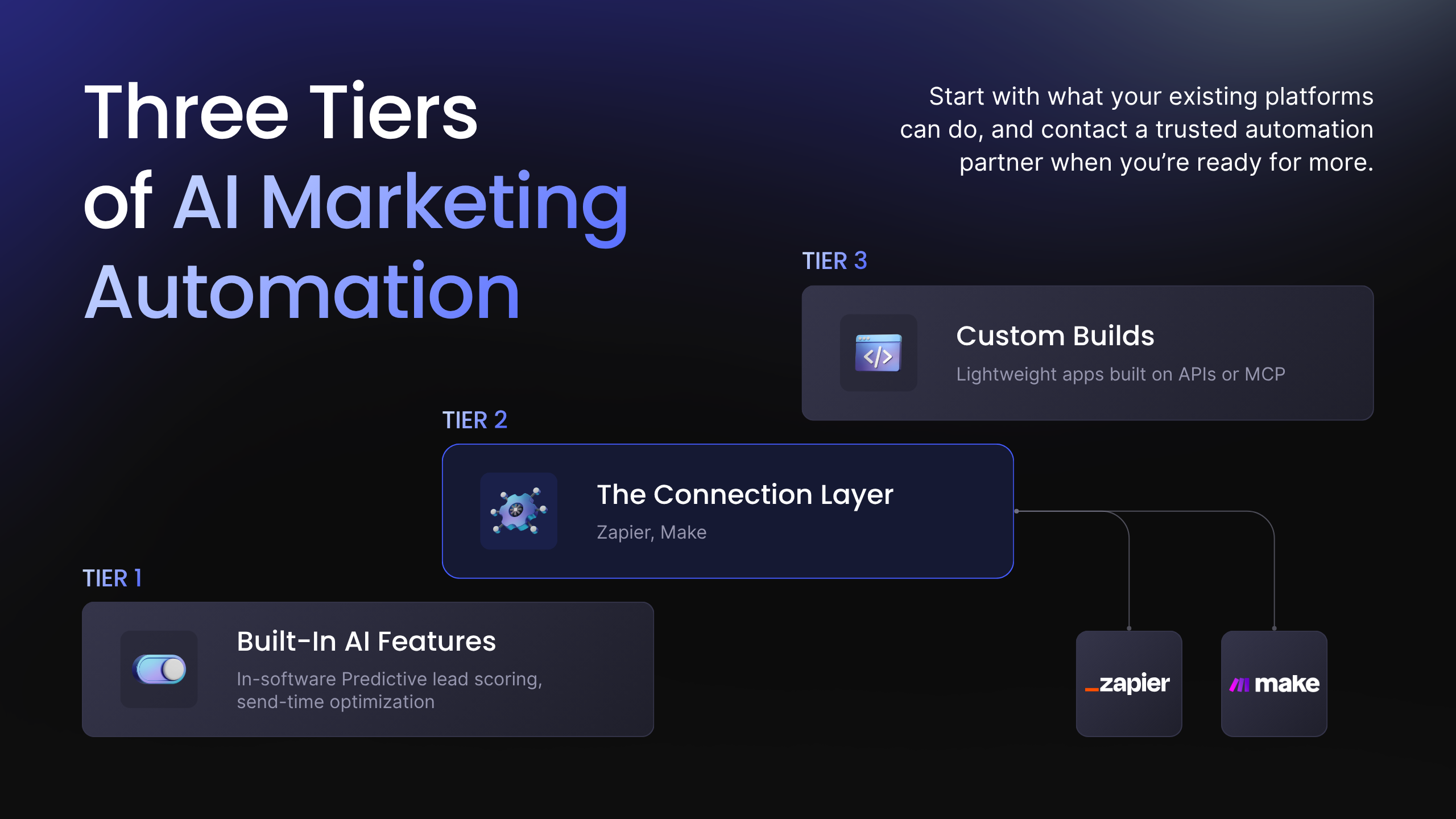
The Three Tiers of AI Marketing Automation Tools and Where Each One Stops
AI-based marketing automation tools fall into three tiers. Tier 1 is the built-in AI features inside the platforms you already pay for. Tier 2 is the automation platforms that connect those tools. And Tier 3 is custom builds for work no product covers.
Each tier does a different job, and each one demonstrates its value at a different point.
Tier 1: AI Features Already Built Into Your Tools
Chances are, the tools you already pay for have AI built in. Most CRMs and email platforms now come with AI features you can turn on with a few clicks.
Two of the most common are predictive lead scoring and send-time optimization. Predictive lead scoring looks at the customers you've already won, spots what they had in common, and tells you which new leads look the most like them. Send-time optimization learns when each person tends to open their email and sends your next message at that time.
If you're just getting started with AI for marketing automation, this is the easiest place to begin. You don't need to connect new tools or spend a lot of money.
The catch is that these features can only see what's inside that one platform. They track things they can count, like clicks and page views. So if a lead asks about pricing in your shared inbox or mentions a deadline on a sales call, your lead score will never know about it. And that lead could end up waiting in a nurture sequence when they're ready to buy right now.
Tier 2: Automation Platforms That Connect Your Tools
Your lead process doesn't live in one place. A lead might fill out a form on your website, show up in your CRM, get an email from your marketing platform, and hear from a rep on a call. Each step happens in a different tool.
Automation platforms like Zapier and Make connect those tools so they can work together. When something happens in one app, like a form submission, the platform kicks off actions in the others. It can create the CRM record, alert the right rep, and start an email sequence, all without anyone lifting a finger.
This is where AI marketing workflows can make the biggest difference. When you add an AI step here, it can read information from every connected tool, figure out what each lead needs, and take the right next step, no matter which tool that step happens in.
That means your team gets smart decisions across the whole process, not just inside one app. The pricing question in your shared inbox and the deadline mentioned on a call can finally shape what happens next.
Tier 3: Custom Builds for Your Unique Process
Sometimes even connected tools can't do everything your business needs. When that happens, a custom build is the next step.
Here are a few signs you might be ready for one:
- Your business has its own way of sorting or qualifying leads, and your tools' settings can't handle it.
- The AI needs information from a system that Zapier or Make can't connect to.
- Your workflow runs so often that platform fees start to cost more than building your own solution.
In these cases, a small custom app can fill the gap. These apps are often built using APIs (application programming interfaces), which let different software share information, or Model Context Protocol (MCP). MCP is an open standard that lets AI connect straight to your tools and data, so it can look things up and take action without a ready-made connector.
That said, most businesses don't need to start here. Get the most out of the tools you already have first, then go custom when your workflow outgrows them.
Implementing AI Automation Into Your Marketing Strategy
Rules-based automation does exactly what you tell it to. That's its strength, and it's also where it stops.
AI marketing automation picks up from there. It reads the reply nobody planned for, figures out what the lead wants, and sends them to the right next step. No one on your team has to do it by hand.
Picture what that looks like. Leads hear back in minutes, even at 9 p.m. Every follow-up fits the person getting it. And your team spends its time closing deals instead of sorting through inboxes.
Getting there doesn't mean rebuilding everything. Start with the spots where someone still has to read something and decide what happens next. Maybe it's the shared inbox someone checks twice a day, or the leads waiting on a manual handoff. Every hour those leads wait is a chance for a competitor to reach them first. These spots are usually the easiest place for your marketing automation transformation to begin.
That's where we come in. Hypelocal has built thousands of automations for businesses that refuse to stall. In a free 30-minute Automation Roadmap Session, we'll look at how your lead process runs today, find where manual work is slowing it down, and give you a clear automation blueprint to act on.
Your next lead is already on the way. Make sure they don't have to wait.
Book your free Automation Roadmap Session.

You may also like

Resources
Productivity
March 30, 2022
The Ultimate Project Proposal Template
Streamline planning with the ultimate project proposal template. Craft effective proposals to align goals, secure buy-in, and drive successful outcomes.
.png)
Search Engine Optimization
May 30, 2025
How to Rank Higher in Local Search (Free AI Prompt Inside)
Boost local SEO fast: use our free AI prompt to generate schema markup—no coding, dev, or plugins needed.
Get in Touch

