


How to Outrank Your Competitors with Keyword Insights from Google Search Console

Atiqur R. Ashik
This is some text inside of a div block.

February 8, 2025

Every business wants to rank higher on Google. And every business knows it’s easier said than done.
Competition is incredibly high for search rankings. And if you’re relying on the same keyword research methods as everyone else, your content is probably blending into the background.
That’s where Google Search Console (GSC) comes in.
While many marketers turn to external tools to chase high-volume keywords, they often overlook the most powerful, first-party data source already in their arsenal.
Unlike third-party tools that estimate search trends, GSC tells you exactly how people are finding your site right now. It provides detailed performance metrics for search appearances, including clicks, impressions, click-through rate (CTR), and average position—allowing you to pinpoint which keywords are working and which need attention.
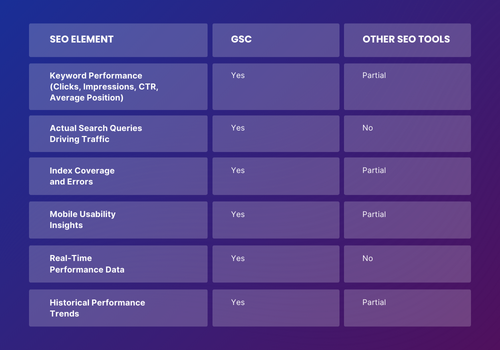
When used strategically, this information can help you cut through the noise, refine your content, and claim the higher rankings that every business wants.
This article will show you how to do exactly that.
You’ll learn how to analyze Google Search Console’s performance data, uncover hidden keyword opportunities, and refine your content strategy for better rankings. By the end, you’ll know how to use GSC to better track the performance of your content—and use that information to get found on Google when potential customers search for you.
The Basics of SEO Analysis in Google Search Console
Before we dive into the step-by-step process of finding high-value keywords, it’s important to cover the basics of SEO analysis in Google Search Console.
Why? Because effective keyword research starts with understanding how your site is already performing. This means looking at two key areas:
- Performance Report: Where you get a bird’s-eye view of how your site shows up in Google search results.
- Queries: Where you uncover the specific keywords driving traffic to your pages.
Mastering these reports will give you the context you need to make smarter SEO decisions and help you identify exactly where the opportunities are hiding.
Start with Google Search Console's Performance Report
Your first stop in Google Search Console should be the Performance Report. This provides a goldmine of search data that tells you how your site is performing in Google’s organic results.
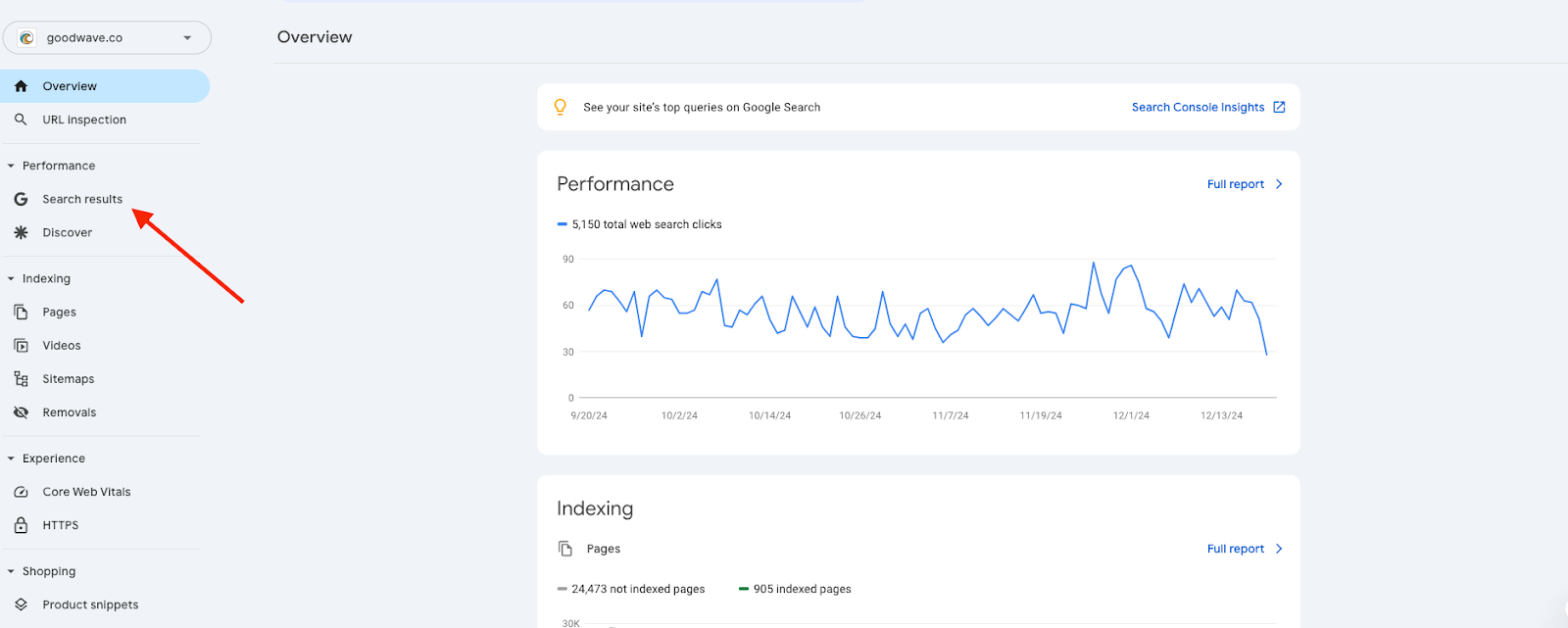
To access it, log into GSC, click on the Performance tab, and open the Search Results report.
Here, you’ll find key insights, including:
- Total Clicks: How many times users clicked on your site from search results.
- Impressions: How often your site appeared in searches.
- Click-Through Rate: The percentage of people who saw your site and clicked.
- Average Position: Your site’s ranking for specific keywords.
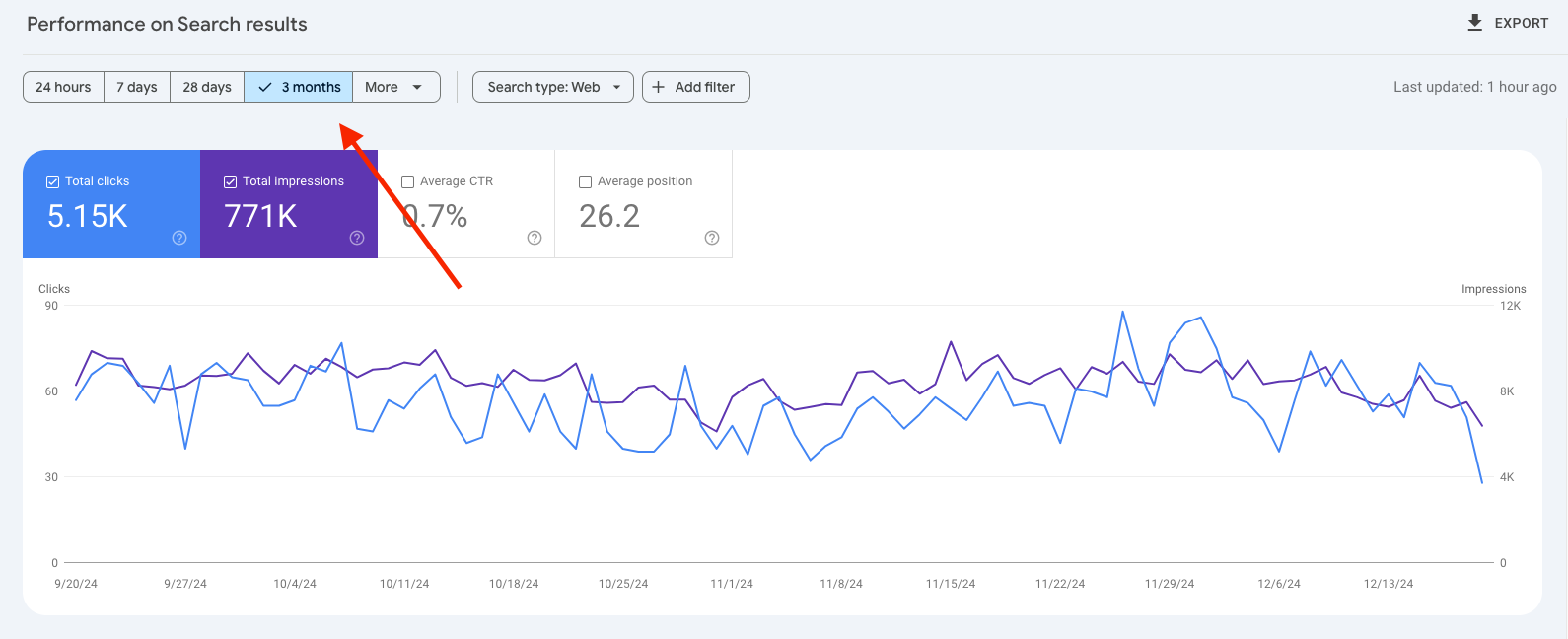
By default, the report shows the last three months of data, but expanding the date range gives you a broader view of search trends and how your rankings have shifted over time.
Analyze Queries for Keyword Insights
Next up is the Queries section. This is a powerful feature that provides a clear view of all the keywords driving organic traffic to your site.
Along with performance metrics like clicks, impressions, CTR, and average position, this data reveals how well your keywords are performing. It also highlights areas that need improvement to further optimize your SEO strategy.
For a more detailed understanding, navigate to the website pages tab, select a specific page, and click on the Queries tab. This will allow you to view all the data and keywords associated with that page, offering insights into how individual pages are performing for specific search queries.
This page-level analysis is invaluable for fine-tuning content strategies and targeting the right audience effectively. It allows you to:
Identify High-Performing Keywords
Review clicks and impressions to understand which keywords bring significant traffic and are worth focusing on.
Develop Near-Ranking Keywords
Use the average position metric to identify keywords ranking just below the first page. Targeted optimization efforts can help push these keywords into top positions.
Analyze Page-Specific Queries
Gain insights into how individual pages attract traffic and determine which queries need additional content or refinement to improve performance.
7 Steps to Finding Great Keywords Through Google Search Console
Now that you’ve got a handle on the basics of SEO analysis in Google Search Console, it’s time to put that knowledge into action.
Here’s a step-by-step process to help you find high-value keywords, uncover growth opportunities, and optimize your content for better search rankings.
1. Open Google Search Console and locate the Performance tab. Under this tab, select Search Results to begin analyzing your website's performance.
2. Use the filter option to set a specific time range. For a comprehensive analysis, select data from the last 12 months. This provides a clear view of your site’s performance trends over time.
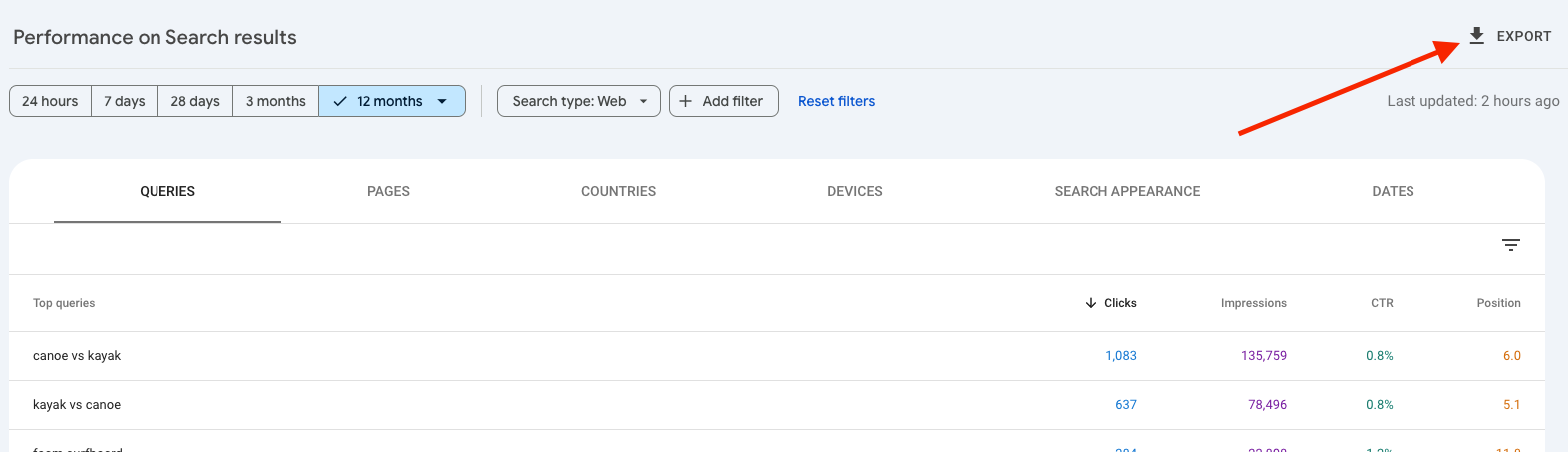
3. Scroll down to view the Queries section. This list shows all the search terms driving organic traffic to your site, along with their performance metrics (clicks, impressions, CTR, and average position).

4. Export this data to analyze it further. For the sake of this example, we’ll export the data to Google Sheets.
- Open Google Keyword Planner (GKP) via Google Ads. Navigate to Tools > Keyword Planner and choose the Search Volume and Forecast option. Upload the exported queries from GSC to get their monthly search volumes.
Ensure you select the appropriate location for accurate results.

- Export the GKP data into Google Sheets and combine it with the GSC data.
Use this formula to merge the two datasets in Google Sheets:
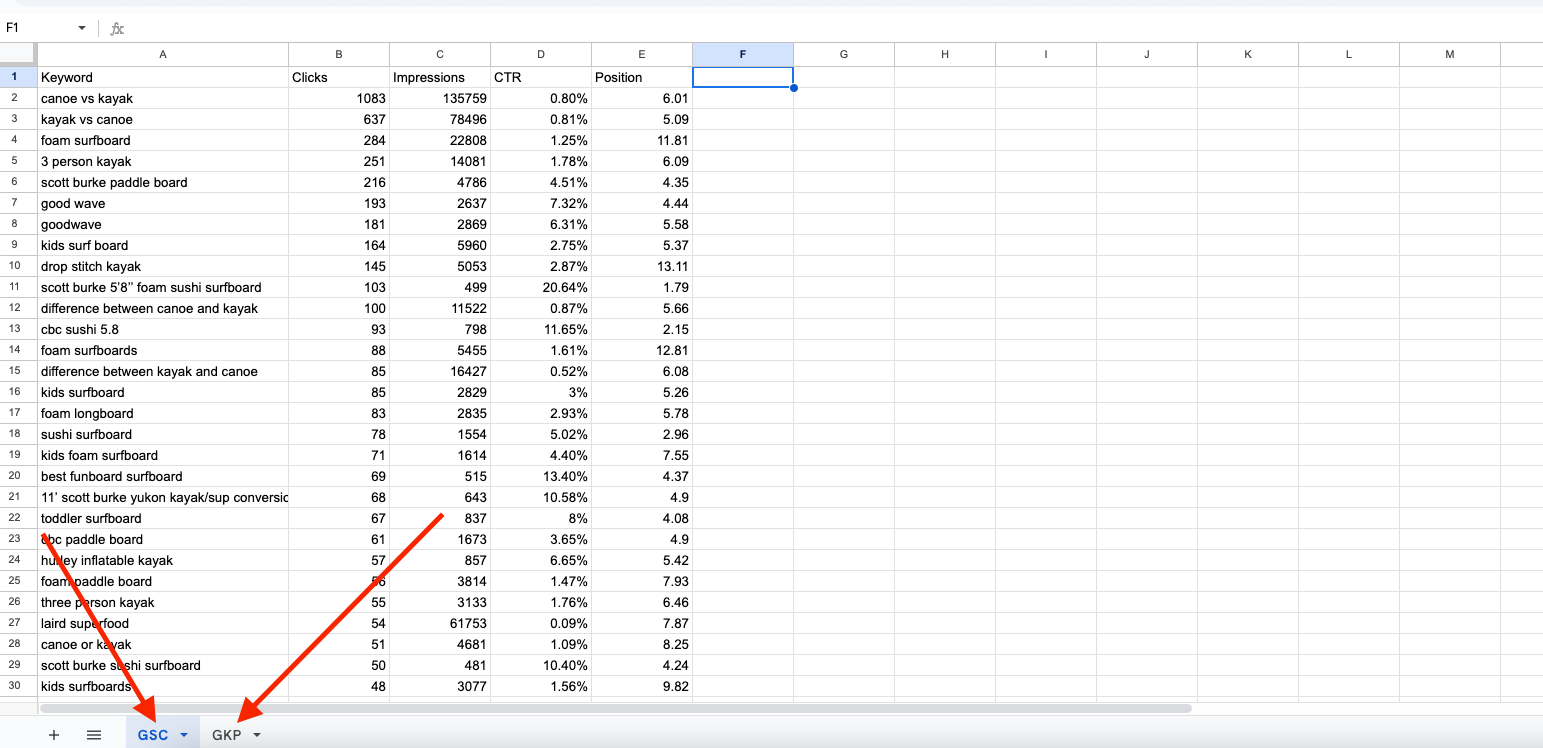
- Now, look for low-hanging fruit keywords: queries that rank between positions 10 and 20, and have high average monthly search volume.
Use the filter feature to isolate keywords within this ranking range.

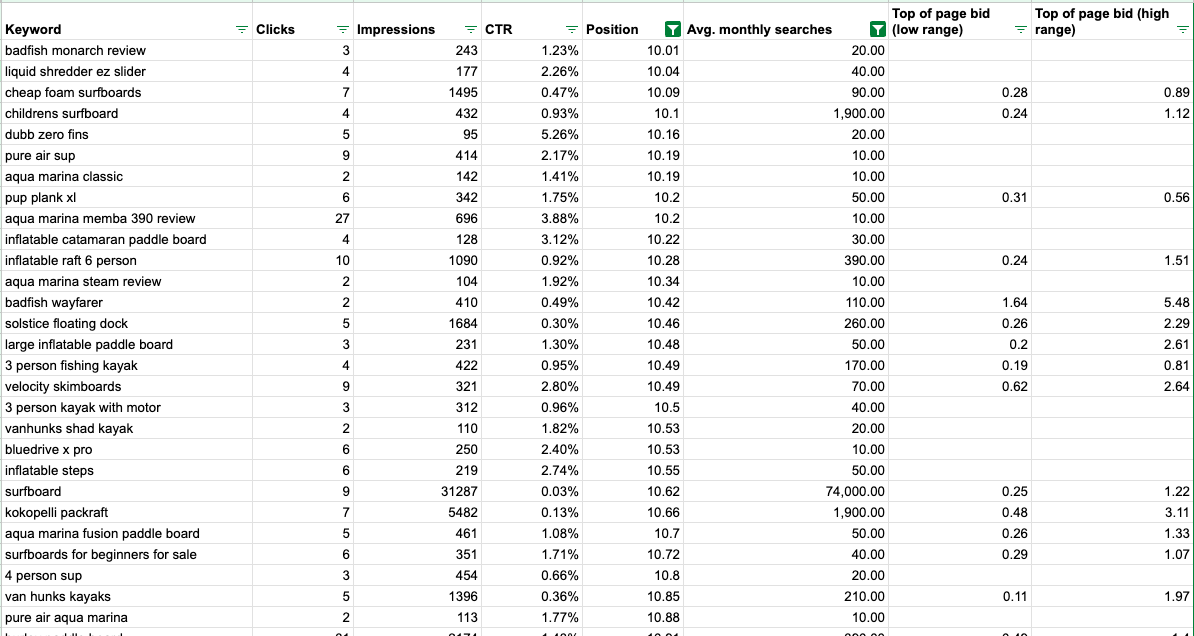
By following these steps, you’ll turn raw search data into actionable insights—helping you identify the keywords that matter most, optimize your content strategically, and cut through the noise by improving your chances of ranking higher in search results.
Uncovering High-Value Keywords
Finding keywords is one thing. Finding the right keywords is another.
High-value keywords aren’t just the ones with the most search volume; they’re the ones that can actually drive meaningful traffic and conversions for your business.
GSC can help uncover the exact search queries that are bringing people to your site—and identify opportunities to optimize, expand, and capture even more of this type of traffic.
In this section, we’ll break down how to:
- Identify low-hanging fruit keywords that are easy wins for higher rankings.
- Target bottom-of-the-funnel (BoFu) keywords that attract high-intent, ready-to-convert users.
- Leverage long-tail keywords to capture niche audiences with less competition.
When you know how to spot these opportunities, you can focus your SEO efforts where they’ll deliver the biggest results—helping you rank higher, attract the right audience, and drive more business.
Identifying Low-Hanging Fruit Keywords
In the step-by-step process above, we used the term “low-hanging fruit” to describe some of the keywords. This refers to terms that rank between positions 10 and 20 in Google search results.
These keywords have strong potential for improving organic search traffic and can be quickly optimized to achieve first-page visibility with minimal effort. By focusing on these terms, you can drive more organic traffic and streamline improvements for your website’s search performance.
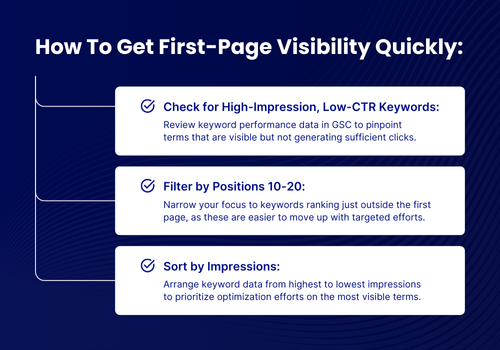
It’s important to keep this process going. By continuously monitoring and refining keyword performance, you can sustain the gains you make, adapt to evolving trends, and uncover fresh opportunities for growth.
Focusing on Bottom-of-the-Funnel Keywords
It’s also important to remember that not all keywords are created equally. The ultimate purpose of keyword research is to get results for your business. That makes BoFu keywords especially important.
BoFu keywords are the words, phrases and questions being used by people ready to take action, whether it's making a purchase, requesting a quote, or contacting your business. Optimizing for BoFu keywords allows you to align your content with the final stage of a customer journey, ensuring it meets the needs of high-intent users and enhances conversion rates.
GSC is incredibly valuable at uncovering BoFu opportunities through question-based queries. By tailoring your content to specific questions, you can significantly improve the relevance and performance of your content. Here’s how to do that:
- Check for Question-Based Queries: Use GSC to review search terms that begin with words like "buy," "price," "near me," or include transactional intent.
- Analyze User Intent: Focus on queries that suggest users are ready to make a decision or purchase, ensuring they align with your products or services.
- Create Dedicated Landing Pages: Develop highly focused landing pages that directly address the intent behind these keywords. Include compelling messaging, benefits, and clear CTAs.
- Provide Specific Answers: Answer user questions directly and thoroughly, ensuring your content solves their pain points or fulfills their needs.
- Develop Local SEO for Location-Based Queries: If you’re a local business, look at queries like "plumber near me" or "best coffee shop in [city]," optimize your content with geographic keywords and claim your Google Business Profile.
By better aligning your SEO strategy with user intent, you can maximize the value of your search traffic and improve your conversion rates.
Look for Long-Tail Keywords
Long-tail keywords consist of phrases with four or more words, offering a strategic way to target niche queries and specific audience interests.
These keywords are particularly valuable because they often face less competition, making it easier to rank for them. Additionally, long-tail keywords tend to align closely with purchase intent, increasing the likelihood of engagement and conversions.
To identify these opportunities, GSC provides detailed insights once again through its Queries report. Sorting and analyzing this data can help uncover "diamond-in-the-rough" keywords that are underutilized and impactful.
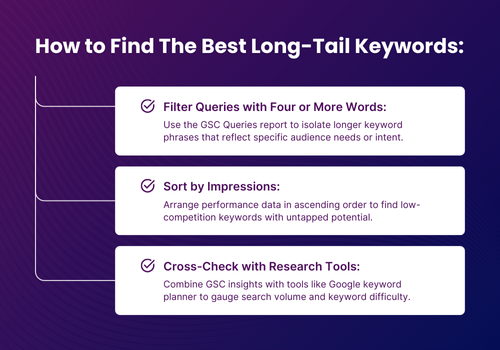
By consistently targeting long-tail keywords, you’re prioritizing the keywords most likely to convert and focusing your efforts on driving highly qualified traffic to your site.
Turning Keyword Insights Into SEO Results
Identifying high-value keywords in Google Search Console is really just the first step.
To turn those insights into real SEO results, you need to optimize your content strategically. This means incorporating target keywords naturally into your meta descriptions, title tags, and on-page content, ensuring they align with search intent. Focus on refreshing pages with high impressions but low click-through rates, improving internal links to boost page authority, and refining content to address the specific queries users are searching for.
Small, targeted adjustments like this help your content stand out in search results, attract more clicks, and ultimately drive meaningful traffic.
Monitoring and Refining Your Keyword Strategy
Optimizing your content isn’t a one-and-done task. Even after you’ve implemented changes based on your keyword research, the work doesn’t stop.
SEO is dynamic. Search trends shift, algorithms evolve, and user behavior changes over time.
To stay competitive and keep breaking through the noise, you need to continuously monitor performance, analyze results, and refine your strategy. This is where Google Search Console becomes invaluable, providing real-time data that helps you track what’s working, uncover new opportunities, and adjust your approach as search trends evolve.
Once your initial optimizations are in place, your focus should shift from implementation to iteration. Regularly reviewing keyword performance allows you to identify patterns, address underperforming content, and stay ahead of algorithm updates.
The goal isn’t just to maintain your rankings. It’s to create a cycle of continuous improvement. By consistently using GSC to guide your SEO decisions, you’ll keep your content competitive, adaptable, and driving organic growth for the long term.
Tracking and Refining for Continuous Growth
If there’s one big takeaway from this guide, it’s that mastering keyword research through Google Search Console isn’t just about finding the right keywords. It’s about creating a sustainable, data-driven approach to SEO.
This is the only way to consistently boost the organic reach of your content and ensure it gets found before the content from your competitors.
By leveraging search data through Performance Report and Queries, you can uncover high-value opportunities like low-hanging fruit, BoFu, and long-tail keywords. Then, with these insights, you can optimize your content to cut through the noise, reach the right audience, and drive conversions.
But the process doesn’t stop there.
SEO is an ongoing cycle of monitoring, refining, and adapting. Continuous analysis helps you stay ahead of shifting search trends, evolving algorithms, and changing user behavior. By making Google Search Console a core part of your strategy, you’ll improve your rankings and build a system that keeps your content relevant, competitive, and impactful over time.
Start applying these strategies today, and realize the full potential of your SEO efforts.

You may also like

AI Marketing
March 25, 2025
What McKinsey Says Is the Real Secret to Making AI Profitable
AI won’t save or sink your marketing. But redesign your workflows around it—and that’s where the real gains start showing up.

Case Study
September 29, 2025
How Hypelocal Won Over An Online Jewellery Retailer With A 937% ROAS
Hypelocal’s ad strategy provided this jewellery retailer with $420K revenue and 937% ROAS.
Get in Touch

