


Why Improving Your Automated Lead Generation Strategy is Better Than Hiring Another Sales Rep

Nathan Schenker
This is some text inside of a div block.

November 3, 2026
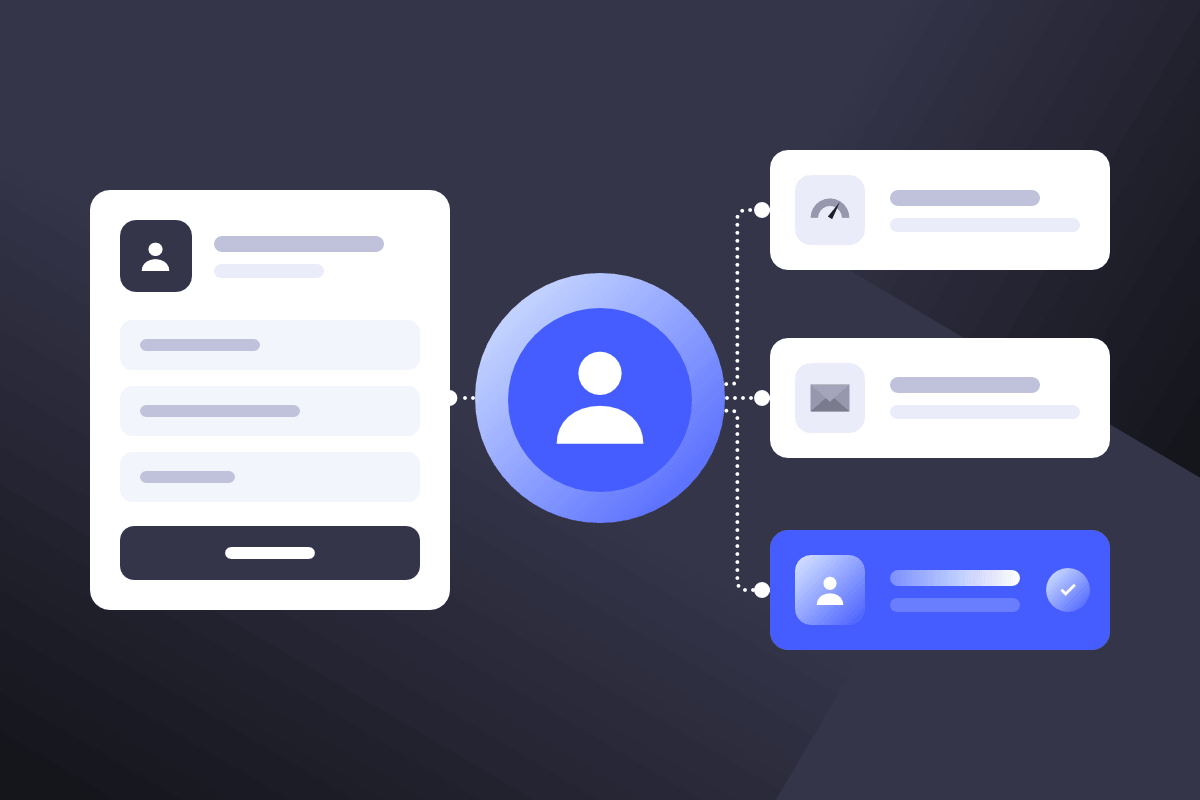
If you had to guess, what matters most to a customer when they reach out to your business?
If you guessed receiving a quick reply, you would be correct.
In today’s competitive business landscape, winning leads is harder than it's ever been.
Digital ad costs keep climbing, customers have more options than ever, and most of their research on you is done before they even think of filling out a single form on your website.
So the only thing separating you from your competition is speed.
That's where automated lead generation comes in.
Automated lead generation helps you capture every lead the moment it arrives, qualify it, follow up on schedule, and route it to the right rep with every detail needed to land the deal.
But understanding how to automate your lead generation strategy isn’t exactly a straightforward process.
It involves connecting the tools you already use, including your website forms, CRM platform, and email. Then setting clear rules for how leads get qualified through automated lead generation software, to ensure there are no loose ends.
In this article, we’ll break down what automated lead generation is and how it works at every stage, from capturing and qualifying leads to nurturing them and handing them off to sales. We’ll also cover the tools that power it, how to measure what’s working, and how an Automation specialist can help you along the way.
What is Automated Lead Generation?
To put it plainly, automated lead generation is the use of software to capture, qualify, nurture, and route leads with little to no manual effort.
That means your team doesn’t have to spend hours copying details from forms, deciding who to call first, or sinking hours into writing follow-up emails.
Unfortunately, many business owners still think lead generation is limited to collecting names and email addresses. And for a long time it was. But in 2026, automated lead generation covers and spans the entire customer lifecycle journey, filling in the gaps in your lead process from the moment someone finds your business online to the moment a sales rep closes the deal.
Here’s an example of what auto lead generation looks like in practice.
A potential customer fills out a form on your website at 9 p.m. Within seconds, their details land in your CRM. The system scores them based on things like company size, budget, or even the pages they viewed. They then get a personalized email within minutes, followed by more messages over the next few days, depending on how you configure your process. Once they indicate they’re ready to buy, the lead goes to the appropriate rep based on their needs, with an instant alert and the full history attached.
Across every touchpoint leading up to the face-to-face with your rep, no one on your team has to lift a finger.
That’s the advantage you can expect when you automate lead generation across your business, and in the coming sections we’ll explain how you can do it.
The Four Steps of Automated Lead Management
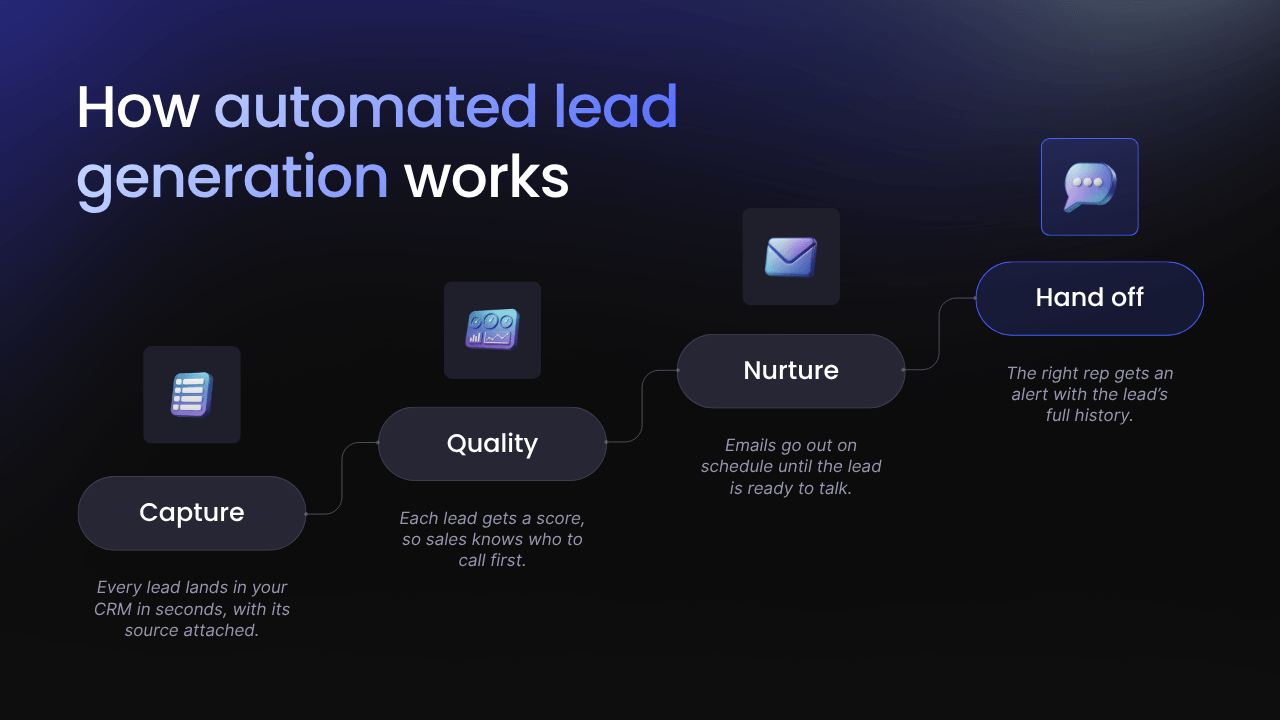
Every automated lead generation system runs on four stages, with each one passing the lead to the next, so it keeps moving without your team having to manually push it along.
To show how each stage works, we’ll use a hypothetical example of an inventory software company that sells to wholesale distributors.
1. Capture: Get Every Lead into Your CRM with Its Source Attached
Capture is the moment in the lead automation process where someone gives you their contact details. In the B2B world, that usually happens through website forms, demo requests, LinkedIn lead ads, webinar sign-ups, or a chatbot.
The goal is to get those details into your CRM within seconds, without anyone copying and pasting. There are three common ways to do it.
The simplest is your CRM’s own forms. HubSpot forms, for example, create a new contact record the moment someone hits submit.
The second is built-in integrations, which are ready-made connections between two tools. Once you switch one on, LinkedIn lead ads can send new leads straight into HubSpot.
Tools that don’t connect on their own can be linked with a platform like Zapier. You set a trigger, which is the event that starts things off (“someone registers for a webinar”). Then you set an action, which is what happens next (“add them to the CRM”).
Every lead also needs a source, so you know which marketing brought them in. Urchin Tracking Module (UTM) parameters are short tags added to the end of your ad links that record the platform and campaign. Hidden form fields, which visitors can’t see, save those tags with the lead.
To get more people to finish your forms, a good practice when you're automating lead generation is to keep them shorter rather than longer. Ask for the information you need, like name, contact information, organization, and any personalized information. Enrichment tools like ZoomInfo or Apollo then use that email to fill in details like company size and industry.
How it works: Back to our inventory software company. An operations manager at a distributor sees the company’s LinkedIn ad and downloads its free guide. Seconds later, the operations manager’s details are in the company’s CRM, tagged with the automated campaigns that brought them in.
2. Qualify: Score Every Lead So Sales Knows Who to Call First
Not every lead is ready to buy, and some simply aren’t a good fit for your product or offering.
The qualifying stage is where your lead automation tools sort them, so your sales team calls the most promising leads first.
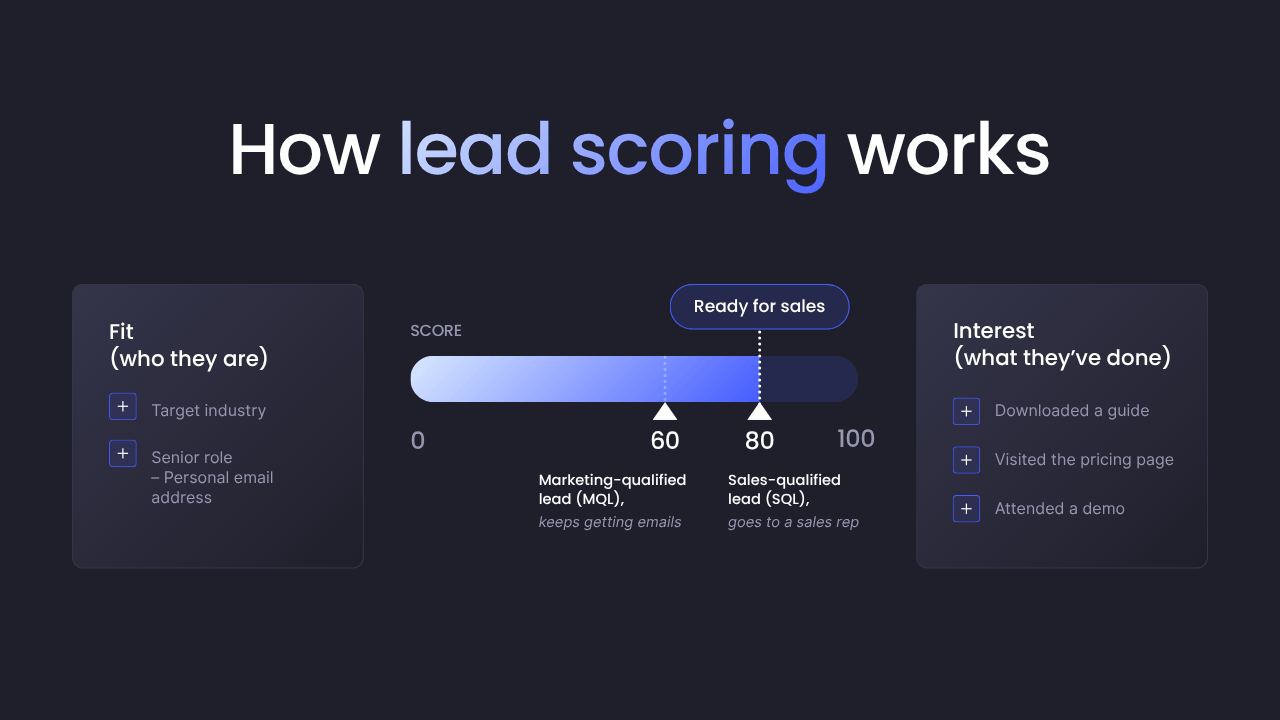
A common industry practice is to use a process called lead scoring, which allocates points to each inbound lead based on how likely they are to buy from you.
To build your scoring rules, review your last 20 to 50 closed deals with your sales team. Look for what those customers had in common, like industry, company size, and job title.
Points come from two places: fit and interest.
Fit refers to who the lead is, like whether they operate in your target industry or have a senior or decision-making role.
Interest has more to do with what they’ve done, like visiting your pricing page or attending a webinar.
You can also subtract points for poor fits, like personal email addresses, small companies, or competitors.
Next, set a threshold, which is the score that means a lead is ready for sales. When a lead crosses it, a workflow (an automated set of steps in your CRM) changes their status from marketing-qualified lead (MQL) to sales-qualified lead (SQL).
The key difference is that an MQL is interested but not ready to talk, but a SQL is ready for that preliminary sales chat.
If you find you have a handful of leads below the threshold, it’s okay to move them into a nurture sequence until they’re ready.
A good habit is to reevaluate your scores monthly, and if high scorers aren’t buying, you can adjust the points to reflect that reality.
How it works: The operations manager we mentioned earlier automatically earns points for their industry, company size, and downloading the free guide on our website.
Their score of 60 is below the threshold of 80, so they become an MQL and move into nurture.
3. Nurture: Stay in Touch Until They’re Ready to Talk
It may not come as a surprise, but B2B buyers rarely buy the first time they reach out.
They compare options and get approval from their team first. Nurturing the relationship is what keeps your business top of mind while they’re deciding.
More often than not, the nurturing process takes place through an email sequence, which is a series of emails sent automatically on a set schedule.
Every sequence needs two rules, or triggers.
First, there’s the enrollment trigger. This decides who gets emails, like “every MQL with a score under 80.”
Then there are exit rules, which decide who stops getting them, like leads who book a demo, reply, become an SQL, or unsubscribe.
Without exit rules, new customers can keep getting sales emails, which is not ideal.
How The Sequence Runs on Its Own
You build the sequence once inside an email automation tool such as Mailchimp or Klaviyo, or, in many cases, from your current CRM. Most tools use a visual builder, where you drag steps onto a screen in the order they should happen.
A basic email sequence consists of three components:
- Emails: The messages you’ve written ahead of time.
- Delays: Wait times between emails, like “wait three days.”
- Branches: If/then splits that send leads down different paths, based on what they do or what you know about them.
Once you switch the sequence on, the tool watches your CRM for anyone who matches the enrollment trigger.
When a lead matches, they’re added, and the first email goes out. The tool then moves each lead through the steps on their own timeline. A lead who signs up Monday and one who signs up Friday get the same emails, just on different days.
The tool also tracks what each lead does. Email opens and clicks are recorded automatically. A tracking code on your website records page visits, like a lead viewing your pricing page.
Actions in other tools, like attending a webinar, can be sent over through an integration. Each action can add points to the lead’s score, and when a lead meets an exit rule, the tool removes them from the sequence on its own.
If your email tool is separate from your CRM, an automation specialist can connect the two so lead details and scores stay in sync.
How it works: Back to our inventory software company. The operations manager’s score of 60 matches one of the enrollment triggers, so HubSpot adds them to the sequence and sends them a free guide.
Three days later, they’re sent a case study and click to read it. On Day 7, they accept the live demo invite and attend, and the webinar tool reports this back to HubSpot.
Their score climbs to 80, making them an SQL, so the exit rule removes them from the sequence and passes them to sales.
4. Hand Off: Route Sales-Ready Leads to the Right Rep
Once a lead is ready to buy, automation hands them to a sales rep. The goal is for the right rep to reach out quickly, already knowing who the lead is and what they want.
First, you set routing rules in your lead generation automation tools or CRM to decide which rep gets each lead. Leads can rotate evenly between reps (called round robin), or go to reps based on region or company size. If the company already works with one of your reps, the lead goes to that rep.
The handoff runs as a workflow that kicks in when a lead becomes an SQL or requests a demo. The workflow assigns the lead to a rep and sends them an alert via Slack, email, or text. The alert shows the lead’s company, score, and recent activity. The workflow also adds a follow-up task to the rep’s to-do list and emails the lead a link to book a call.
If the rep doesn’t follow up within a set time, like two business hours, the workflow reassigns the lead or alerts a manager. After the call, the rep records the result in the CRM, and leads who aren’t ready yet go back into lead nurture sequence.
HubSpot and Salesforce both handle routing, alerts, and tasks. Calendly and Chili Piper can create booking links.
How it works: When the operations manager becomes an SQL, HubSpot assigns them to the rep for mid-sized distributors. The rep gets a Slack alert, and the operations manager gets an email to book a demo.
The Benefits of Automating Lead Generation
Once you’ve created an automatic lead generation system, it doesn’t take long before you start to see the benefits. Below are a few that you’ll likely notice after only a few weeks following implementation.
Response Times While Prospect Interest Is Still High
A lead who fills out your form at 9 p.m. shouldn’t have to wait until someone checks the inbox the next morning. By then, they may have contacted a competitor too.
With lead gen automation, their details land in your CRM in seconds, and a personalized email goes out within minutes. Once they’re sales-ready, the right rep gets an instant message, such as a Slack alert, so the lead hears back while they’re still thinking about the problem they came to solve.
Consistent Follow-Ups
It’s no secret that manual follow-ups break down when reps get busy. A note gets lost, another client demands more time and resources, and ultimately another lead who was close to buying hears nothing for weeks.
Automatic lead generation sequences send every email on schedule to every lead who qualifies. Exit rules stop the emails once someone books a demo. If a rep doesn’t call within two business hours, the workflow reassigns the lead or alerts a manager.
Clearer Visibility Into What Drives Sales
Copying leads into spreadsheets by hand causes typos, missing fields, and lost sources among many other setbacks. This makes it hard to tell which automated campaigns brought in buyers, and which didn’t.
With automatic lead tools, every lead is recorded the same way. UTM tags save the ad that brought prospects in. Enrichment tools add company size and industry. Every email click and pricing page visit is logged to the right contact. When a deal closes, you can trace it back to the LinkedIn ad that started it, then put more budget behind what works.
More Output From the Same Team
When lead volume doubles, so does the busywork. And regrettably, we’ve come to accept that as a given. Entering form data, sorting leads, writing follow-ups, and assigning reps. The usual fix is to hire.
Automation handles those steps instead. Your marketers spend their time on campaigns, and your reps spend theirs on calls with buyers who are ready to talk.
All the while, you get more results without adding more people.

When to Bring in an Automation Specialist
Now that you’ve seen what automated lead generation can do, you might be ready to set it up yourself. That’s a great place to start. Just know that most DIY setups hit a ceiling once lead volume starts to grow.
Here are a few signs you’ve reached yours:
- Your tools don’t talk to each other, so someone still copies leads by hand.
- Your CRM is full of duplicate contacts and leads with no source attached.
- Automations that worked fine at first start breaking as more leads come in.
- You can’t tell which campaigns are bringing in sales.
If that sounds familiar, it usually means your business is growing faster than your setup.
A system that keeps up has to be built around your sales funnel, connected across your tools, and tied to revenue. That takes planning before anything gets switched on.
That’s what we do for businesses here at Hypelocal. As a Certified Zapier Solution Partner, we connect your forms, CRM, and email so every lead flows through one system. We set up scoring, follow-ups, and routing that run on their own. So every lead gets followed up on, from first contact to signed deal. Our team has built thousands of automations that have saved hundreds of thousands of hours.
Not sure where to start?
Book a free 30-minute Automation Roadmap Session with our team. We’ll pinpoint what’s slowing you down and give you a clear blueprint showing you where automating your lead process should start.
How to Create a Lead Generation System with The Right Tools for Automated Lead Generation
You don’t need a dozen new apps to automate your lead process. Most setups run on five types of tools, and you probably use a few already.
CRM
HubSpot and Salesforce are the home base for every lead. Each contact record holds the lead’s details, score, source, email activity, and deal history. Workflows inside the CRM change lead status, assign reps, and send alerts by Slack or email. Enrichment tools like ZoomInfo and Apollo plug in to fill in company size and industry from just an email address.
Forms and Landing Pages
These capture leads at the moment of interest. HubSpot forms create a contact record the second someone hits submit. Landing pages built in Webflow can pass form data to your CRM through an integration. Add hidden fields to every form so UTM tags save with the lead, and you’ll always know which campaign brought them in.
Email platforms
Mailchimp and Klaviyo run your lead nurture sequences. You set the enrollment trigger, delays, and branches once, and the tool moves each lead through on their own timeline. It also logs opens and clicks, so leads earn points as they engage. HubSpot has email built in if you’d rather keep everything in one place.
Integration Platforms
Zapier links tools that don’t connect on their own. You pick a trigger, like a new webinar sign-up, and an action, like adding that person to your CRM. One automation can run several steps in a row, so a single form fill can update your CRM, alert a rep, and log the lead in Google Sheets.
AI-powered Tools
Chatbots answer questions on your site around the clock, gather lead details, and pass leads to the right place. AI agents handle complex tasks on their own, like researching a new lead before a rep reaches out. Booking tools like Calendly and Chili Piper then let sales-ready leads pick a call time with no back-and-forth.
Before you buy anything new, check which integrations your current CRM already offers.
Where to Start With Automated Lead Generation
As a business owner, you already know every lead that comes in deserves a fast reply and a steady follow-up.
Automated lead generation is how you make that happen. It captures each lead in your CRM, scores it, nurtures it, and hands it to the right rep, all without manual work. Your team spends less time on data entry and more time talking to buyers who are ready to talk.
You don’t have to build it all at once. Start with the gap that’s costing you the most leads today, like slow replies or missed follow-ups. Then add the next step once that one runs on its own.
Ready to build the full system?
Book a free 30-minute Automation Roadmap Session with our team. We’ll pinpoint what’s slowing you down and give you a clear blueprint showing what to automate first.

You may also like

Email Marketing
May 26, 2025
How to Develop an Email Marketing Campaign That Drives Results
Learn 7 steps to build high-ROI email campaigns: segment, write, automate, and track for real results.

Search Engine Optimization
May 30, 2025
How to Rank Higher in Local Search (Free AI Prompt Inside)
Boost local SEO fast: use our free AI prompt to generate schema markup—no coding, dev, or plugins needed.
Get in Touch


