


The 2026 Guide to Email Marketing Automation

Nathan Schenker
This is some text inside of a div block.

October 5, 2026
.png)
Email marketing automation solves a problem every business eventually runs into.
Staying in touch with every customer at the right moment.
For years, businesses handled email by hand, which led to late follow-ups, generic messages, and countless hours lost to manual work.
Worse, there was no clear way to tell which emails were bringing in revenue.
But email itself was never the problem.
It's still one of the most reliable channels a business has, mostly because it lands directly in people’s inbox, and from a business they want to hear from.
Email automation is just the process of delivering that value more efficiently.
Automated email marketing takes the labour-intensive work out of the equation, allowing you to set up an email once, deliver it at various times, and reach every customer the moment they sign up, buy, book, or go quiet.
And there’s no shortage of email marketing automation tools to help you do it.
Plus, with the arrival of AI, your process for reaching the right customer with the right message has become much easier.
AI can write and personalize messages, pick the best send time, spot which leads are most likely to buy, and even connect your email automation platform to your Customer Relationship Management platform/CRM, store, or booking system.
Below, you'll learn everything you need to get started with email marketing automation. Once the basics are in place, you'll see how AI and a few simple integrations can take your results even further.
What Is Email Marketing Automation?
Email marketing automation is the process of sending emails automatically when a customer takes a specific action or reaches a specific date. It allows you to decide ahead of time what should happen, while your automated email campaigns send each message for you.
The action that starts the email is called a trigger.
This marketing email automation event could be as simple as someone joining your email list, placing an order, booking an appointment, or even hitting a milestone like their “one-year” anniversary as a customer.
Once the trigger happens, your email goes out. You don't need a sticky note reminder, and you don't have to dig through your inbox to remember who asked for a quote last Tuesday.
You've probably already received hundreds of these types of automated emails yourself.
But just to refresh your memory, here are some of the most common ones:
Welcome emails
Designed to greet new subscribers the moment they sign up
Order confirmations
These emails are sent after a purchase
Appointment reminders
Sent a day or two before a booking
Renewal notices
They go out before a subscription or service contract expires
Birthday offers
Arrive on a customer's special day with a discount or small gift
Seasonal Promotional and Marketing offers
Emails sent when businesses are looking to send time-associated offers. Such as Black Friday deals or Christmas product promotions.
Sales Sequence and Lead Management Emails
If you’ve ever filled out a business’s question or lead form, then these emails may sound familiar.
Each one of these emails follows the same simple idea.
Something happens, and the right email responds to it automatically.
What’s changed is how the work gets done.
With manual email, every message takes time to write, address, and send. With automated email marketing, you only set up each email once. From then on, your automated email marketing software sends your message out to every customer who meets the conditions you've pre-defined.
This could look like your appointment reminder working the same way for the first booking as it does for the thousandth. Or, your welcome email reaching every new subscriber, including the ones who sign up after your business’s operating hours.
This consistency is possible because you’re operating an automated email system, rather than sending off one email at a time with no sequence, structure, or rhythm.
So what's actually happening behind the scenes when an automated email sends? Let's break it down.
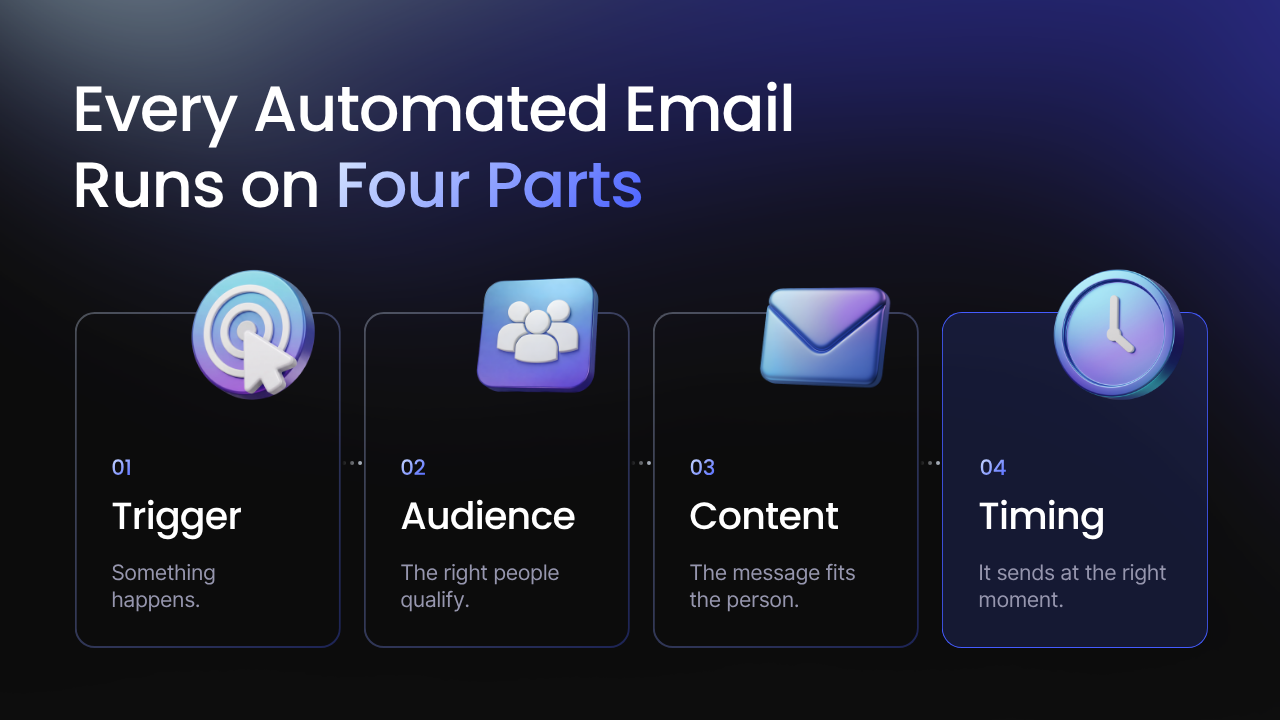
How An Email Marketing Automation Workflow Operates Behind the Scenes
All of your automation emails run on the same four parts, whether it's a one-line order confirmation or a six-email onboarding series. Once you understand them, you can build almost any email workflow your business needs.
Think of it as a set of instructions you hand to your email automation platform. For example, once this happens, send this message, to these people, at this time.
The Trigger
The trigger is the event that starts everything. Without it, nothing gets sent.
For the most part, triggers fall into two groups.
Action-based and date-based.
Action-based triggers fire when a customer does something, like filling out a quote form, adding a product to their cart, or booking a consultation.
Date-based triggers fire around calendar dates. Think birthday messages, renewal dates, or 90 days since someone's last visit.
You can also trigger campaign automations based on something a customer hasn't done.
This could include something like a new subscriber ignoring your first few emails, or a past client who hasn't booked in six months. These “silence events” can be used to trigger a message from you or your business.
But the triggers that are most beneficial for businesses are the ones tied to buying moments.
A quote request or an abandoned cart is a buying moment, and each one should set off a trigger. These are the moments when a fast, automatic email is most likely to turn into a sale.
The Audience
The audience is the group of people who receive your email marketing automations once the trigger fires. Sometimes that's everyone who hits the trigger, but usually you'll want to narrow it down.
You do this with segments and conditions. Segments group customers by what they have in common, like past purchases or the services they've booked. Conditions are rules that decide who qualifies for each email.
For example, a welcome email might go to every new subscriber, while a first-order discount only goes to subscribers who haven't bought anything yet.
Conditions also stop the wrong email from going out. Nobody wants a "complete your purchase" reminder for an item they bought an hour ago on their phone. A simple rule like "only send if no order has been placed" prevents that.
The Email Content
This is the message itself, which includes the subject line, body copy, images, and call to action.
Because the content is written once and sent many times, it has to work for every person who receives it. That's where merge fields come in. They pull details from your customer records, like a first name, the product someone bought, or the date of their appointment, and drop them into the email automatically.
The more customer data your email and marketing automation tool can access, the more specific each message gets. "Hi Sarah, your appointment is Thursday at 3 p.m." is far more relatable than "Hi there, don't forget your appointment."
The Timing
Timing decides when your message is sent after the trigger fires inside your email automation system.
Some emails should go out instantly.
For example, order confirmations and quote acknowledgments lose value with every minute of delay.
Others work better with a pause.
A review request arrives better a few days after a job is finished than the moment the invoice is paid.
An email automation for an ecommerce store that’s sending an abandoned cart reminder would be better sent a few hours later, while the customer still remembers what they were shopping for.
Most email marketing automation tools let you set delays in minutes, hours, or days, and limit sends to certain days or business hours.
How Single Emails Link Together Into an Email Automation Flow
One automated email handles one moment.
But when you link several together, you create an email sequence (sometimes referred to as a drip campaign or email automation campaign) that guides a customer through several steps over days or weeks.
Here's what a simple post-purchase sequence could look like for an online store:
- Day 0: A welcome email thanks the customer and confirms their order the moment it's placed.
- Day 5: A product tip email shows them how to get the most out of what they bought.
- Day 14: A review request asks how it's going and links straight to your review page.
Each email has its own content and timing, but the whole sequence starts from a single trigger.
Along the way, you can also add branches. So if the customer leaves a review, they can be removed from the sequence. Or, if someone clicks a product in the tip email we mentioned, they can move into a separate sequence built around that product.
Rules-Based vs AI-Driven Email Automation
Everything we’ve covered so far describes the most common type of email marketing automation: rules-based.
In a rules-based automation, you set the trigger, the audience, the content, and the timing, and the system follows your instructions to a T.
That works well for a lot of emails.
But there's a second approach, AI-driven automation, that lets each email adapt to the person receiving it.
Rules-Based Automation and “If-Then” Instructions
Rules-based automation runs on simple if-then logic.
If a customer requests a quote, then send the quote follow-up email.
If someone books an appointment, then send a reminder 24 hours before it.
In these fixed contexts, the same trigger always sends the same email.
Every customer who requests a quote gets the identical message, on the identical schedule, whether they're a first-time visitor or your biggest repeat client.
Now yes, that predictability is useful and applies well to quite a few different sequences.
Order confirmations, booking details, receipts, and password resets should read the same way every time, and a fixed rule guarantees they will.
The limit is that a rule only knows what you told it. You have to guess the best send time, decide every segment in advance, and write every version of every email yourself. A customer who has bought from you five times still gets the same "thanks for your first order" email as someone brand new, unless you built a separate rule to catch it.
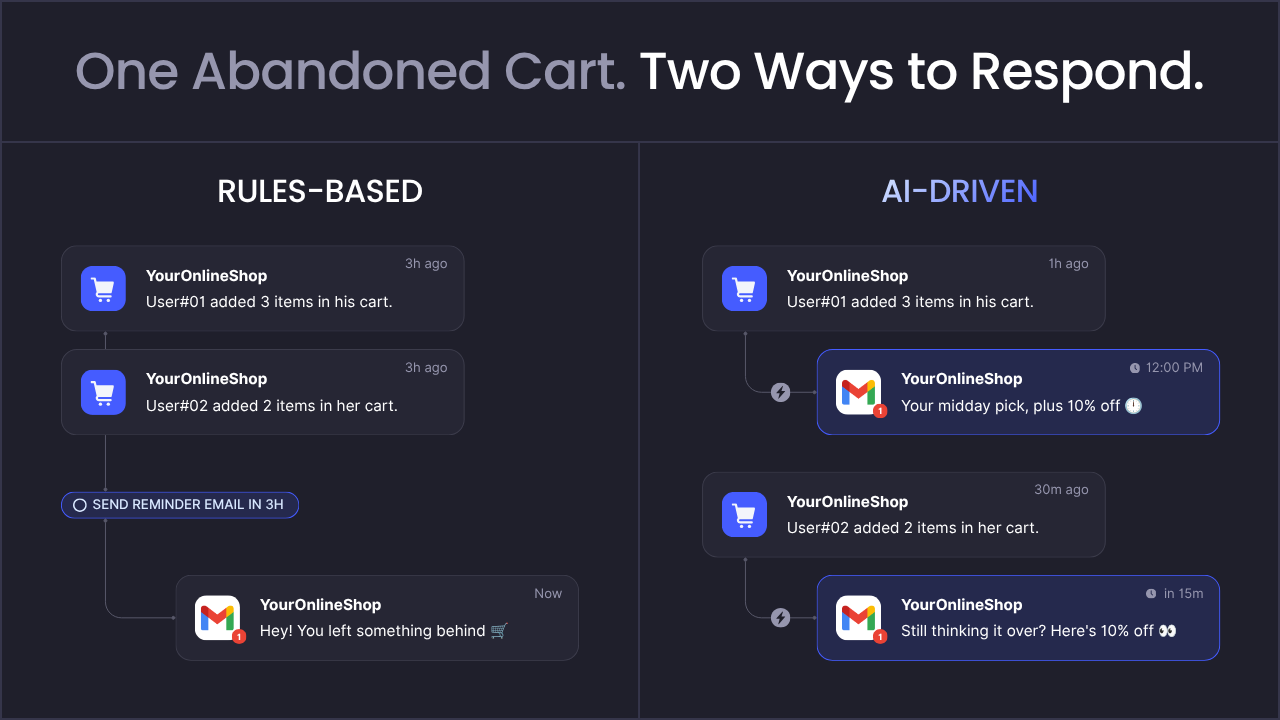
AI-Driven Automation: Emails That Change Based on Each Person
AI-driven automation still starts with a trigger.
It’s what happens after the trigger that differs.
Instead of sending one fixed message, AI looks at what it knows about each customer, including their behaviour on your site, their purchase history, and how they've engaged with past emails.
Then it adjusts the email to fit.
Take an abandoned cart reminder.
With a rules-based setup, everyone gets the same "you left something behind" email three hours later. With AI, a loyal customer who usually buys on their lunch break might get a reminder at noon the next day featuring a related product they're likely to want.
Or in the case of many businesses, a first-time browser who hasn't opened any of your emails might get a shorter message with a clear reason to come back.
Starting to see the difference with rule-based automations?
Here's a deeper overview of how the two approaches compare side by side:
Why You Should Connect Your AI Email Automations to Your CRM, Store, and Other Tools
AI can only personalize an email with the information it can see.
If your email automation platform is cut off from the rest of your business, it's working with a partial picture.
That's why integrations matter so much.
When your email tool connects to your CRM, online store, booking system, and other platforms, every system shares data and can act on it.
Connected tools also give a clear view of which emails bring in sales.
When your email platform and your store or CRM share the same data, you can see that a win-back email led to a booking, or that a product recommendation led to a second purchase.
Getting Email Marketing and AI Automation Right With Hypelocal
Effective email marketing automation takes more than an email tool.
You need a strategy for which emails to send, segments that match each message to the right people, copy that moves customers to act, workflows that fire on the right triggers, tools that share data, and ongoing testing to keep improving results.
If one piece is missing, your entire email marketing strategy can flop.
At Hypelocal, our Demand Generation Marketing team builds your lifecycle strategy, sharpens your messaging, and writes the emails that move customers from first signup to repeat purchase.
Then, our AI Automation team connects your email to your CRM, store, and booking system. Adding AI that personalizes each message, picks the best send time, and responds to customers for you.
Our work has generated more than $600M in client revenue, and we've built thousands of automations for businesses just like yours.
Ready to get started? Book a free Automation Roadmap Session. In 30 minutes, we'll show you which emails to automate first so fewer leads slip away.
The Benefits of Email Automation For Businesses
Once your email marketing automation strategy is up and running, the benefits show up quickly. Here are a few common ones.
More Sales, Bookings, and Repeat Purchases
The biggest advantage of email automation for sales is timing.
Every customer hears from you at the moment they're most likely to act. Quote requests get a same-day follow-up, bookings get their reminder, and customers who haven't been back in a while get a reason to return.
Meaning more leads turn into sales, more appointments show up, and more one-time buyers come back for a second order.
Hours Back Every Week
Writing emails, sending them one at a time, and keeping your lists up to date racks up work hours fast. With automation, that work gets eliminated, so your team can focus on managing customers and executing strategy.
Personalization Without Extra Staff
AI personalizes each email using the customer data you already have, like purchase history, browsing behaviour, and how someone has engaged with past emails.
With a platform like Zapier, you can connect your email tool to AI, your store, and your CRM, so each message gets its copy, send time, and product recommendations adjusted to fit the person receiving it. It works just as easily for 5,000 customers as it does for 50, without adding headcount.
Clear Proof of What Drives Revenue
When your marketing automation email platform connects to your CRM or store, you can see which emails lead to sales and bookings.
That makes it easy to keep what works, fix what doesn't, and put your budget where it earns the most.
Examples of Email Marketing Automation in Action
Most businesses run on the same handful of automated emails. Here's what each one does and when it should be sent.
Welcome Emails
A welcome email sends the moment someone joins your list, when their interest is highest. Use it to introduce your business, set expectations for how often you'll email, and give a clear first step, like a discount or booking link.
Abandoned Cart Reminders
When a shopper adds items to their cart and leaves, this email reminds them what they left behind. The first usually goes out within a few hours, with an optional second nudge a day later.
Order and Booking Confirmations
These send seconds after a purchase or booking and confirm the details: what was ordered, the date and time, and what happens next. Customers expect them and open them, so they're a good place for a helpful tip or link.
Onboarding Sequences
An onboarding sequence is a short series sent over a new customer's first few weeks. Each email teaches one thing, like setting up a product or preparing for a first appointment, so customers get value quickly.
Review Requests
A review request asks happy customers to share their experience. Send it a few days after a job is finished or an order arrives, once they've formed an opinion, and link straight to your review page.
Win-Back Emails
Win-back emails go to customers who haven't bought or booked in a set period, like 90 days. A reminder of what they liked, a new service, or a limited-time offer gives them a reason to return.
When choosing which email automation fits your needs, it’s best to start with the one or two closest to revenue, like abandoned cart reminders for an online store or win-back emails for a service business, then add the rest over time.
How to Measure Your Email Marketing Automation Results
Once your automated emails are running, the next question is whether they're working.
Every email you send should answer the same question: how is this driving sales and profit?
The right numbers show you which emails bring in revenue, which need work, and where to focus next.
But it’s worth starting with these five if you’re unsure.
Open Rate
Just as it sounds, it’s the percentage of people who open your email. It's a quick way to check if your subject lines or timing needs a little work.
So use it as a rough signal, not proof of results.
Click-Through Rate
The percentage of recipients who click a link. It shows whether your content and call to action gave people a reason to act and led them to the desired page you wanted them to reach.
Conversion Rate
The percentage of recipients who completed the goal of the email, like booking, buying, or leaving a review.
This is the meat and potatoes of email marketing, and it’s where you see if an email campaign did its job.
Revenue Per Email
This one’s a little more advanced, but if there’s an e-commerce component to your email marketing, it’s worth a look. It includes the total revenue a campaign generates divided by the number of emails sent.
It's the clearest way to compare one automation against another.
Unsubscribe Rate
This is the percentage of people who opt out after an email. A sudden spike usually means the message, timing, or frequency is off.
Turning Email Marketing Into a Growth System
Your email list is one of the few marketing channels you fully own.
You don't pay for every impression, you aren't at the mercy of an algorithm, and everyone on it has already shown interest in what you offer.
That makes it one of the most direct paths from marketing spend to revenue.
But a list only grows your business when you use it well. If emails go out only when someone finds the time, you're just not using the channel to its full potential. Businesses that treat email as a system, with a plan for every stage of the customer journey, get far more out of every subscriber.
Automation and AI make that system possible without adding work for your team. The biggest gains come when email stops running on its own and works alongside the rest of your marketing and operations, so each part makes the others stronger.
Building that kind of system is what we do best at Hypelocal, and we’d love to help you build yours.
Book a free Automation Roadmap Session, and we'll walk through what email could be doing for your business and where to start.

You may also like
.png)
AI Marketing
September 30, 2026
How to Use AI in Marketing Automation
If you work in marketing, you've heard the term AI marketing automation by now. It's in every platform's release notes and half the LinkedIn posts in your feed. But what it means depends entirely on who's saying it.
.png)
Search Engine Optimization
May 30, 2025
How to Rank Higher in Local Search (Free AI Prompt Inside)
Boost local SEO fast: use our free AI prompt to generate schema markup—no coding, dev, or plugins needed.
Get in Touch

