


How To Do Paid Advertising Audits That Will Maximize Your ROI

Trent Walker
This is some text inside of a div block.

February 4, 2025

Every year, millions of dollars are spent on paid advertising campaigns that miss the mark.
Whether it’s due to poor targeting, weak messaging, or a lack of data-driven optimization, the result is the same: Marketing budgets that don’t deliver the return on investment (ROI) businesses expect.
There’s a way to prevent this.
Regular audits of your paid advertising campaigns help identify hidden inefficiencies, optimize performance, and ensure every dollar you spend is working hard to grow your business.
In this guide, we’ll walk through how to effectively audit paid advertising campaigns across three major platforms—Meta (Facebook and Instagram), LinkedIn, and Google Ads. Each of these channels offers unique opportunities and challenges.
Understanding how to audit them properly can help you transform underperforming ads into high-converting campaigns.
Why Paid Advertising Audits Are Essential
Before we get going, however, it’s important to understand that audits aren’t just about fixing what’s broken. They’re about staying ahead.
Even campaigns that are performing well today may not deliver the same results next month. Audience behaviors shift, platform algorithms evolve, and business goals change over time. Without regular check-ins, even the most successful campaigns can become outdated, inefficient, or misaligned with your objectives.
That’s where audits come in.
They provide the clarity needed to identify gaps, optimize targeting, refine messaging, and adjust budgets based on real performance data. More than just a troubleshooting tool, audits help ensure your campaigns remain agile, relevant, and consistently aligned with your business objectives.
With that in mind, let’s dive into how to audit campaigns on three of the most powerful advertising platforms: Meta, LinkedIn, and Google Ads.
How to Audit Facebook and Instagram Ads
With over three billion users combined, Facebook and Instagram offer businesses unparalleled reach. But that scale can be a two-edged sword.
Without careful management, your ads can quickly become lost in the noise—or worse, shown to the wrong audience altogether.
That’s where a thorough audit comes in.
Step 1: Review Your Account Structure
The first step in auditing your Meta ads is to review how your account is structured.
Many marketers jump straight to performance metrics, but without a solid structure, even great ads can underperform.
Start by reviewing your campaigns to ensure they’re aligned with specific objectives—whether that’s brand awareness, lead generation, or conversions.
If you have redundant campaigns targeting similar audiences, merge them to streamline efforts and avoid budget waste.
Next, examine your ad sets. Each set should target distinct audience segments to prevent internal competition.
Look for:
- Overlapping audiences that may cause bidding inefficiencies.
- Underperforming segments that need refinement.
- Clear, consistent naming conventions to simplify reporting.
Finally, review the ads themselves.
Each ad set should have three to six variations to allow Meta’s algorithm to optimize delivery based on performance. A mix of creative formats ensures your message resonates across different audience preferences.
Step 2: Check Tracking Settings
Without accurate tracking you’re flying blind, making decisions based on incomplete data.
First, confirm your Facebook Pixel is correctly installed and firing events as intended. This small piece of code tracks crucial actions like page views, purchases, and form submissions. If you’re using custom events, verify they’re capturing data accurately.
Then, review your attribution settings: Are they aligned with your campaign goals? For fast-moving sales cycles, a one-day click attribution window might provide more relevant insights than the standard seven-day window.
Adjusting these settings helps you understand how your ads contribute to conversions and where your budget is most effective.
Step 3: Audit Audience Targeting
Even the best ad creative won’t perform well if it’s shown to the wrong audience. That’s why refining your targeting is essential.
Start by reassessing your current audience settings. Are the demographics, interests, and behaviors still aligned with your ideal customer? If not, it’s time to update.
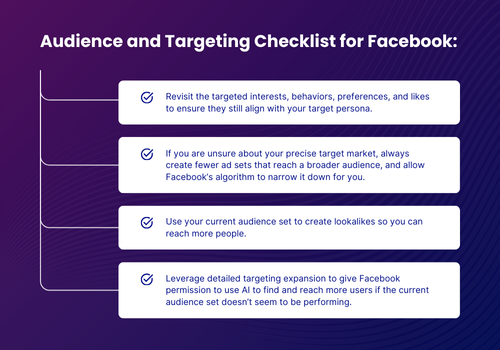
Effective targeting isn’t just about who you include—it’s also about who you exclude. By eliminating irrelevant audiences, you reduce ad fatigue and make every impression count.
Step 4: Analyze Ad Content
Even with perfect targeting, your ads won’t perform if the creative isn’t compelling.
Social media users scroll quickly, so your ads need to grab attention and deliver value within seconds. Review your ad copy for clarity, conciseness, and relevance. Is your messaging aligned with your audience’s needs and pain points? Are your calls-to-action clear and compelling?
Visuals are just as critical. To keep your content fresh and engaging:
- Rotate creative assets regularly to avoid ad fatigue.
- Experiment with different formats like carousels, videos, and reels to see what resonates best with your audience.
The goal isn’t just to capture attention—it’s to inspire action. Your creatives should stand out in the feed while also driving meaningful engagement and conversions.
LinkedIn Ads Audit: Driving Results in a Premium B2B Environment
LinkedIn is ideal for B2B marketing, offering access to decision-makers, industry leaders, and professionals across the globe.
However, this premium audience comes at a premium price. Without regular audits, you risk overspending without achieving the desired outcomes.
A thorough audit ensures that your LinkedIn campaigns are not only aligned with your business goals but also optimized for efficiency, relevance, and ROI.
Step 1: Revisit Your Goals
Before diving into metrics and performance data, it’s crucial to revisit your advertising goals.
Are your campaigns designed to build brand awareness, generate leads, or drive conversions? Your objectives should align seamlessly with your broader marketing strategy.
If there have been shifts in your business—like new product launches, changes in target markets, or updated KPIs—your LinkedIn campaigns need to reflect these changes to stay effective.
Ask yourself:
- Are your current campaigns supporting your business’s growth goals?
- Have shifts in your target audience been accounted for in your strategy?
This step sets the foundation for the rest of your audit, ensuring that every adjustment you make is tied to a clear, measurable goal.
Step 2: Review Account-Level Settings
Account-level settings might not seem exciting, but they’re essential for keeping your campaigns organized and secure.
Start by reviewing how your account is structured. Are campaigns clearly named and logically organized, making it easy for your team to manage? Consistent naming conventions simplify reporting and prevent confusion, especially as your campaigns scale.
Next, audit user access. Over time, it’s common for permissions to accumulate, leaving former employees or outdated third-party vendors with access they no longer need. Removing unnecessary access reduces security risks and keeps account management streamlined.
Finally, double-check your billing information to ensure there are no surprises that could disrupt your campaigns.
Step 3: Campaign Performance Review
At the campaign level, it’s all about alignment: Are your campaigns set up to achieve the goals you defined earlier?
LinkedIn offers objectives like awareness, consideration, and conversions, and selecting the wrong one can lead to poor performance and wasted budget.
Review the following:
- Campaign objectives: Are they correctly chosen for each campaign’s purpose?
- Bids and budgets: Are they competitive enough to reach your target audience without overspending?
- Conversion tracking: Is it set up accurately to capture key actions like form submissions or content downloads?
Additionally, ensure you’re running multiple ad variations within each campaign. This allows LinkedIn’s algorithm to identify top performers and optimize delivery based on real-time data, helping you get the most from your budget.
Step 4: Optimize Targeting
LinkedIn’s targeting capabilities are one of its biggest strengths, allowing you to reach specific industries, job titles, and company sizes.
However, targeting that was effective in the past may no longer be relevant if your business focus has shifted. For example, if your company recently expanded its offerings to target freelancers in addition to small businesses, your audience settings should be updated to reflect this change.
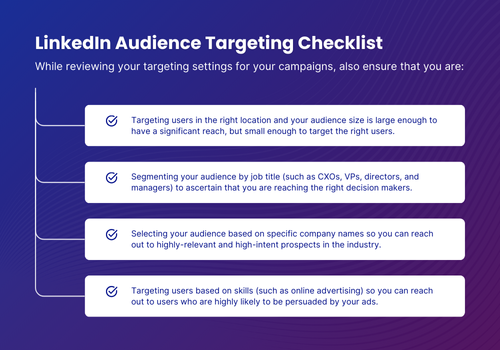
Finally, don’t forget about exclusions. Removing irrelevant audiences helps reduce wasted impressions and ensures your budget focuses on high-intent prospects.
Step 5: Audit Ad Creative
Even with perfect targeting, uninspiring creatives can derail your campaign’s performance.
LinkedIn’s professional environment demands content that’s not just attention-grabbing but also credible and relevant. Review your ad copy with this in mind to ensure it’s clear, concise, and tailored to your audience’s pain points. Are your calls-to-action compelling and specific? Do your headlines spark curiosity or highlight a key benefit?
Visually, your ads should stand out in a busy LinkedIn feed. To keep your creative fresh:
- Experiment with formats like single-image ads, carousels, and video content.
- Test different headlines, visuals, and CTAs to identify what resonates most.
- Refresh creative regularly to prevent ad fatigue and maintain engagement.
Step 6: Review Landing Pages
If your ads are driving clicks but not conversions, the problem might not be the ad itself—it could be the landing page.
A strong landing page should deliver on the promise of the ad, providing a seamless, relevant experience that guides users toward the desired action.
When auditing your landing pages, check for:
- Message alignment: Does the content match the ad’s offer and intent?
- Clear value proposition: Is it obvious what the user will gain by converting?
- Mobile optimization: Is the page responsive and fast-loading across devices?
- Effective CTAs: Are forms, buttons, and links easy to find and functional?
Even small tweaks, like improving page load speed or simplifying a form, can significantly boost conversion rates.
Google Ads Audit: Making Every Click Count
With billions of daily searches, Google Ads provides unmatched reach for businesses looking to capture high-intent traffic.
However, without regular audits, even well-structured campaigns can become inefficient over time, leading to wasted spend and missed opportunities.
Step 1: Reassess Your Goals
Before diving into the data, revisit your campaign goals. Ask yourself: “Are they still aligned with your business objectives?”
Whether your focus is on driving website traffic, generating leads, or increasing sales, clearly defined goals are essential for measuring success and optimizing performance.
Step 2: Review Account Settings
Then, just like the previous platforms, review your account-level settings to ensure everything is functioning as it should.
Confirm that conversion tracking is set up correctly, with tracking codes properly installed and firing on the right pages. Linking your Google Ads account to Google Analytics provides additional insights into user behavior, allowing for more informed optimization decisions.
Evaluate your bidding strategies by asking:
- Are your bids aligned with your goals, targeting CPA or ROAS for conversion-focused campaigns?
- Are you overbidding and inflating costs?
- Are you underbidding and missing valuable traffic?
Adjusting your bidding approach based on performance data can significantly improve both efficiency and ROI.
Step 3: Campaign and Ad Group Structure
A well-organized campaign structure is key to effective management and performance.
Review your ad groups to ensure they are tightly themed, with relevant keywords grouped together. Too many keywords in a single ad group can dilute relevance, leading to lower quality scores and higher costs.
Responsive search ads should be included in each ad group, allowing Google’s algorithm to optimize combinations of headlines and descriptions based on user behavior. This dynamic approach helps improve ad relevance and performance over time.
Step 4: Keyword Analysis
Keywords are the heart of any search campaign. An effective audit identifies which terms are driving results—and which are draining your budget.
Here’s what to focus on:
- Underperforming keywords: Are there terms with high spend but low conversions? Consider pausing or adjusting them.
- Match types: Are you balancing broad, phrase, and exact match keywords effectively to maximize reach without sacrificing relevance?
- Negative keywords: Regularly update your list to prevent ads from showing for irrelevant searches, reducing wasted spend.
By fine-tuning your keyword strategy, you’ll improve both the efficiency and effectiveness of your campaigns.
Step 5: Landing Page Review
Just as we mentioned with the other channels, your specific landing pages play a crucial role in converting ad clicks into actions.

Ensure each landing page is relevant to the ad it’s linked to, offers a clear value proposition, and provides a positive user experience. That last point means testing for mobile responsiveness, fast load times, and functional forms to reduce friction in the conversion process.
Step 6: Review Audience Targeting
While Google Ads is known for its keyword-driven targeting, audience settings play a crucial role in refining who sees your ads.
Start this last step of the Google Ads audit by reviewing your current targeting parameters:
- Are you reaching the right demographics, locations, and devices?
- Are there segments that consistently underperform and need adjustment?
Consider implementing remarketing campaigns to re-engage users who’ve interacted with your site but haven’t converted. Additionally, leverage audience insights from Google Analytics to identify new opportunities for targeting high-intent prospects.
Fine-tuning your audience targeting helps ensure your ads are reaching the people most likely to convert, improving both efficiency and results.
Creating an Action Plan Post-Audit
After completing your audit, it’s time to organize your findings into an actionable plan:
- Start with quick fixes—immediate changes like adjusting targeting settings, fixing tracking issues, or pausing underperforming ads.
- Next, identify short-term actions that may require more time, such as testing new creatives or refining bidding strategies.
- Finally, document insights that can inform your long-term strategy, such as opportunities for new campaigns, audience segments, or landing page improvements.
Why Auditing Improves ROI
A successful paid advertising strategy isn’t about setting campaigns live and hoping for the best. It’s about continuous improvement, data-driven decisions, and regular audits.
By systematically reviewing your Meta, LinkedIn, and Google Ads campaigns, you’ll not only maximize your ad spend but also drive more meaningful results for your business.
Don’t wait for performance to drop before taking action. Start auditing today to get the most out of your marketing investment.

You may also like

Demand Generation Marketing
May 10, 2022
Demand Generation Marketing: The Key to Long-Term Business Growth
Drive sustainable business growth with demand generation marketing. Build valuable customer experiences, meet evolving expectations, and create lasting brand connections.

Demand Generation Marketing
November 7, 2024
How to Create Profitable Revenue with Results-Driven Marketing
Learn how results-driven marketing increases profits by combining demand gen, automation, AI, and CRM to nurture leads and streamline sales.
Get in Touch


